View updated Running Formulations
Find a client’s Running Formulation and review how it develops as new session Notes are generated.
2 mins read
A formulation brings together a client’s concerns, recurring patterns, strengths and possible explanations for their difficulties. It helps you develop an understanding of the client and reflect on the direction of therapy.
AirNote keeps a Running Formulation for each client, drawing on their saved session Notes. After a new Note is successfully generated, AirNote updates the formulation in the background to reflect the developing work together.
1. Open the client’s details
Select a session for the client in the sidebar, then click View Client (the person icon) in the app toolbar.

The client’s details page opens. You can return here at any time, including before the next session, to review the latest available formulation.
2. Read the Running Formulation
Scroll to Running Formulation, below the client’s Sessions. The Updated date and time show when it was last refreshed. Scroll inside the formulation box to read further.
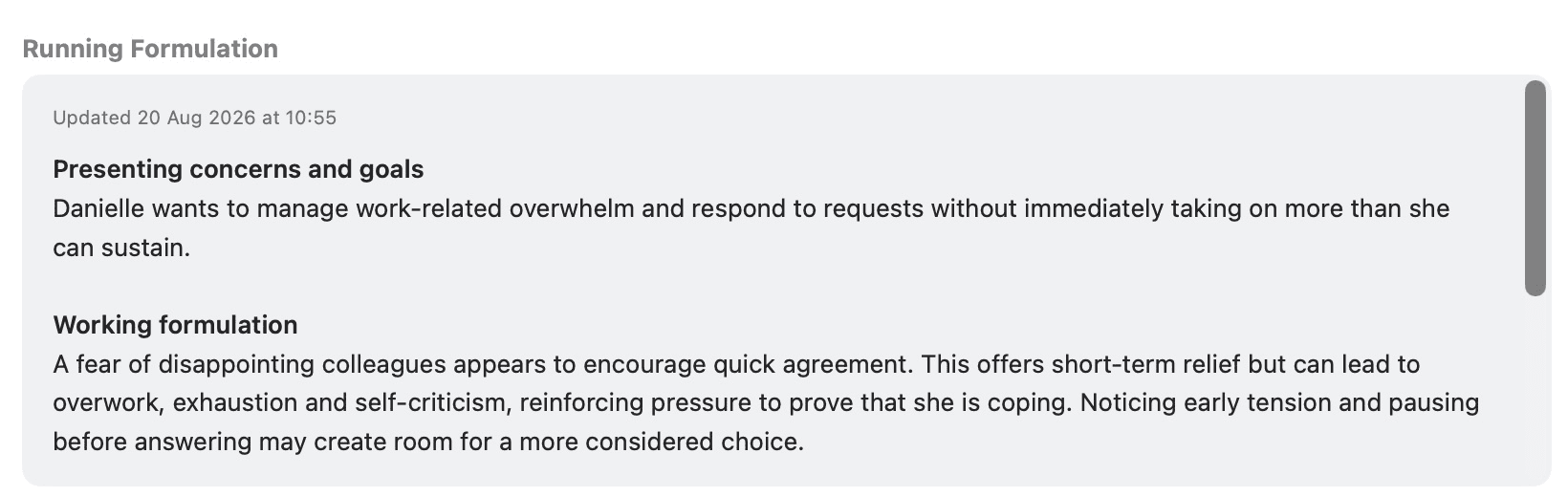
The formulation brings together the client’s presentation and goals, a working understanding of their difficulties, strengths and protective factors, and developments or uncertainties to explore.
When an update finishes while you are viewing the client’s session, a brief green Running Formulation updated message appears beneath View Client. You can then open the client’s details to read it.
Treat the Running Formulation as a working understanding to review alongside your Notes and clinical judgement. It develops from the information captured in the saved Notes.
Automatic updates are on by default. You can find the Running Formulation & Session Prep setting in Settings > General.
All people and session content shown in these screenshots are fictitious.